
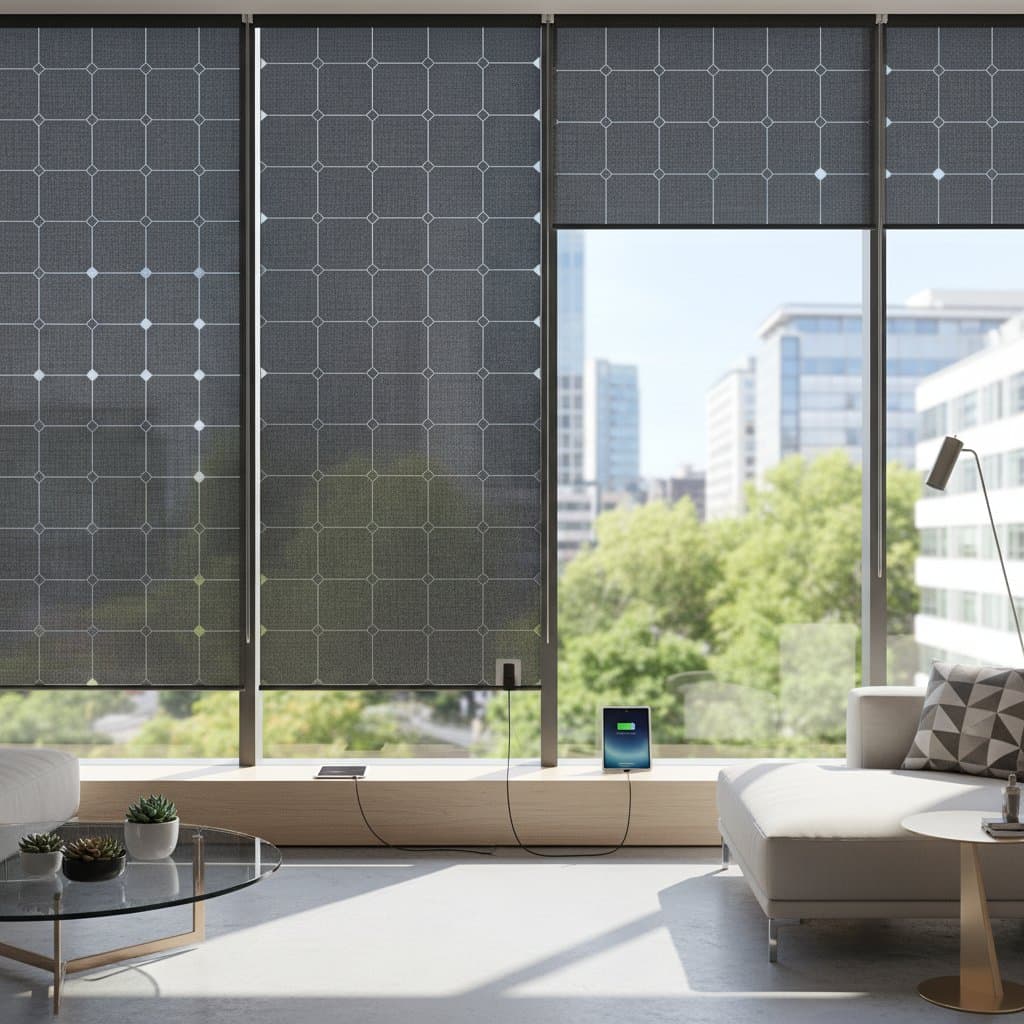
Solar Shades: Powering Devices with Everyday Sunlight
Sunlight enters most homes through windows, offering an untapped resource for energy generation. Solar shades extend beyond glare reduction by incorporating photovoltaic technology to capture light and convert it into electricity for charging devices. This approach addresses the challenge of powering phones, speakers, and sensors without additional outlets or tangled cords.
Readers gain practical knowledge on how these shades function, installation procedures, and selection criteria. Consider suitability for spaces with direct sunlight exposure for at least several hours daily to achieve optimal results.
Understanding Solar Shades
Solar shades resemble conventional window treatments but integrate slender photovoltaic strips to absorb sunlight. The collected energy powers small electronics or charges battery packs. Factors such as sunlight intensity, window direction, and shade dimensions influence output levels.
Verify that window frames support the installation weight and that electrical connections align with home standards. Protect components from moisture to ensure longevity and safety.
Required Tools and Materials
Prepare the following items for a successful setup:
- Measuring tape to determine window dimensions
- Screwdriver and level for aligning brackets
- Solar shade kit featuring photovoltaic film
- Optional battery pack or power hub
- USB or low-voltage cables for device connections
- Ladder or step stool for access
- Soft cloth for panel cleaning
- Safety glasses and gloves for protection
Existing roller shades may accommodate retrofit solar film. Review manufacturer guidelines to confirm compatibility and avoid damage.
Installation Steps
1. Measure and Plan
Determine the width and height of each target window to ensure full glass coverage, which maximizes energy capture. Log daily sunlight duration in the space. South-facing orientations typically yield the highest light levels. Identify locations for power lines or battery hubs.
2. Select Appropriate Shades
Choose fabric density that balances light transmission with privacy needs. Lighter weaves enhance charging potential at the expense of some seclusion. Opt for shades with monocrystalline or thin-film panels in the upper section for superior efficiency, even in varied lighting.
3. Prepare the Installation Area
Clean window frames and sills thoroughly to remove debris that might compromise adhesion. In moisture-prone areas, such as near sinks, apply silicone sealant to gaps for added protection against humidity.
4. Secure Mounting Brackets
Position brackets using a level for precision. Fasten with screws into wall studs or appropriate anchors capable of supporting the shade's weight. Maintain perpendicular alignment to optimize sunlight capture; any tilt diminishes effectiveness.
5. Attach the Shade
Follow manufacturer instructions to slide or clip the shade into brackets. Test the rolling mechanism for smooth operation prior to wiring. Orient solar cells outward toward the window to receive direct light.
6. Connect Power Components
Link the low-voltage cable from the shade to the battery pack or USB port. Secure cables along the frame with adhesive clips to prevent snags. Steer clear of tight bends or pressure points on wires.
7. Verify Charging Performance
Position shades in sunlight for several hours, then connect a device like a phone. Observe if charging initiates promptly. Low output may require angle adjustments or removal of external obstructions, such as foliage.
8. Integrate Automation Features (Optional)
Pair shades with smart hubs and light sensors for automated operation. Shades deploy to collect energy during peak sun and retract to minimize glare. Complete setup via hub instructions and validate through mobile or voice controls.
9. Establish Cleaning Routine
Accumulated dust reduces efficiency over time. Clean panels biweekly with a dry or lightly damp microfiber cloth. Avoid abrasive cleaners that could harm the photovoltaic surface.
Essential Dos and Don’ts
Dos
- Position shades on sun-exposed windows for extended periods.
- Confirm wiring compatibility before installing multiple units.
- Employ the provided charge controller to regulate power flow.
- Perform gentle cleanings to maintain panel clarity.
- Track output via apps or meters to detect performance issues early.
Don’ts
- Drill into lightweight frames like aluminum without structural assessment.
- Allow cables to contact sharp surfaces.
- Expose panels to water immersion or sprays.
- Link high-draw items such as heaters or laptops.
- Rely on shaded or north-facing windows for consistent results.
Situations Requiring Professional Assistance
Engage experts for installations involving intricate wiring, integration with home energy systems, or obscured mounting surfaces. Professionals handle connections to wall outlets or expanded battery setups. Seek a licensed electrician for any wiring wear, unstable connections, or voltage irregularities.
Cost and Time Overview
Solar shades range from several hundred to over one thousand dollars per unit, influenced by dimensions, material quality, and output capacity. Retrofitting cuts expenses by approximately half when compatible. Expect one to two hours per window for DIY installation after gathering materials.
Larger windows, multiple installations, advanced photovoltaics, and smart features elevate costs. Hiring professionals incurs labor fees but guarantees secure and reliable outcomes.
Ongoing Maintenance Practices
- Wipe dust from panels every two weeks using a microfiber cloth.
- Examine wiring monthly for signs of damage or loose fittings.
- Assess charging efficiency quarterly to ensure consistent delivery.
- Swap out degraded cords or batteries upon noticing reduced speed or alerts.
- Refresh sealant around frames if moisture intrusion occurs.
Sudden output declines warrant full-sun testing. Persistent issues may indicate cell wear; consult the manufacturer for diagnostics or replacements.
Expert Perspective
Dr. Lena Ortiz, energy systems engineer at BrightHome Labs, highlights the multifaceted benefits of solar shades. “They regulate sunlight to lower heat buildup, conserving energy, while simultaneously producing power for the same area,” she states. Households often generate sufficient output to sustain phones, speakers, and sensors throughout the day.
Placement proves crucial, according to Ortiz. Direct light for several hours sustains charge levels, though diffuse light contributes modestly. Full shade hampers long-term viability.
How Solar Shades Generate Energy
Photovoltaic cells within the shades transform sunlight photons into direct current electricity. This flows via internal wiring to batteries or USB ports for device charging. Advanced setups may contribute to home microgrids.
Panel type dictates performance: monocrystalline excels in intense light, while thin-film manages scattered rays with moderate yields. Elevated temperatures near vents can slightly impair efficiency.
These shades diminish reliance on grid power for chargers and streamline window-area organization. Renters benefit from this non-invasive solar option, bypassing roof modifications.
Safety Considerations and Compatibility
Low-voltage systems minimize electrical hazards, yet dryness remains essential. Install away from humidifiers or kitchens. Double-pane windows with low-emissivity coatings generally permit adequate light passage, though infrared blockers may reduce yields.
Store battery packs in cool, shaded spots per guidelines. Prevent physical damage to cells through careful handling.
Expanding Solar Shade Applications
Begin with high-light windows in active areas. Monitor weekly energy production using built-in displays or apps. Positive yields justify broader implementation in sunlit rooms.
Kitchens and offices see immediate gains: desk-adjacent shades charge phones and peripherals, while kitchen units support speakers or sensors. Limit connections to devices below the shade's rated capacity, using hubs as needed.
Sunrooms and patios suit humidity-resistant models. Always verify product specifications for environmental tolerances.
Evaluating Energy Benefits
Solar shades complement rather than supplant rooftop systems, providing targeted power for electronics. A sizable window offsets multiple daily charges; multiple units amplify household impact.
Returns hinge on local rates and solar availability. Beyond finances, the placement convenience for low-power devices enhances appeal, particularly for expanding smart home networks.
Integrating Solar Shades for Everyday Efficiency
Adopt solar shades to merge comfort with sustainability. They deliver glare control and device power, fostering energy independence. Track usage patterns to refine setups, ensuring sustained performance and reduced environmental footprint.